Escalation in Strait of Hormuz Sparks Concern Over US-Iran Peace Deal
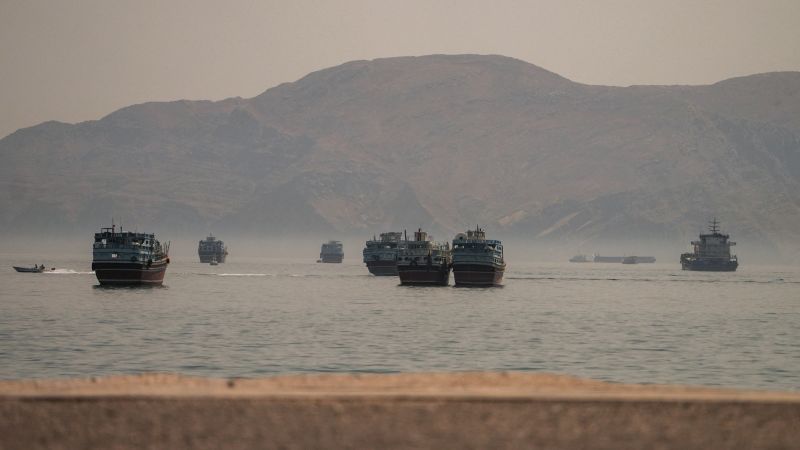
Sandego.net – On Saturday, reports emerged of a commercial vessel in the Strait of Hormuz suffering damage from an unknown projectile, according to the United Kingdom Maritime Trade Operations (UKMTO). The incident occurred as the United States and Iran engaged in a series of military exchanges, raising alarms about the fragility of their recently signed peace agreement. While the exact cause of the strike remains unclear, the event followed a sequence of attacks that have tested the stability of the framework established between the two nations. The developments underscore the precarious balance of the deal, which aims to normalize maritime traffic through the vital waterway.
Iranian Strikes Target US Positions
Iran’s Revolutionary Guards claimed they had launched attacks on US military installations in the region, as reported by Iranian state media, Press TV. The foreign ministry of Iran condemned the US for breaching the terms of the agreement, accusing it of undermining the accord. However, a US official told CNN that the country had “detected a couple drones” during the confrontation, though they did not successfully hit their intended targets. This exchange marks the first instance of direct military action since the memorandum of understanding was inked last week, signaling a potential return to hostilities.
“The unwarranted aggression against commercial shipping by Iranian forces clearly violated the ceasefire,” stated CENTCOM, the US Central Command, following the strikes.
Bahrain, which hosts a US military base, also faced Iranian drone attacks early Saturday morning. The nation’s foreign affairs ministry denounced the strikes as “a flagrant violation of Bahrain’s sovereignty,” highlighting the growing regional tensions. Despite these incidents, Tehran has yet to issue a formal statement, leaving the motives behind the attacks ambiguous. The strikes have further complicated the already delicate relationship between the US and Iran, as both sides navigate the implications of their actions.
Threat Level Raised Amid Escalation
The Joint Maritime Information Center (JMIC), under the oversight of the US Navy, increased the threat level in the Strait of Hormuz to “substantial” on Saturday. This decision came after a series of attacks on merchant vessels, which have raised concerns about the safety of global maritime trade. The JMIC also announced the expansion of a route near Oman, allowing for increased bidirectional traffic through the strait. This move suggests the US is taking steps to counter Iran’s influence over the critical waterway, which is a lifeline for oil exports and international commerce.
The escalation began with an Iranian attack on Thursday, targeting a commercial vessel near the strait. US President Donald Trump characterized the strike as a “foolish violation” of the agreement designed to end hostilities between the two countries. The attack was followed by US military strikes on Friday, which hit Iranian missile and drone storage locations, as well as coastal radar sites. These actions have intensified the cycle of retaliation, casting doubt on the agreement’s ability to maintain peace in the region.
“US aircraft struck Iranian missile and drone storage locations and coastal radar sites,” CENTCOM confirmed in its statement.
Vice President JD Vance, who played a central role in negotiating the agreement with Iran, remarked Friday evening that “violence will be met with violence.” His comment reflects the determination of the US to defend its interests in the region, even as the deal seeks to establish a ceasefire. The recent strikes have reignited fears of a renewed conflict, with the strait serving as a focal point for both nations’ strategic objectives.
Memorandum of Understanding Faces Scrutiny
The peace deal, signed earlier this month, outlines Iran’s commitment to “arrangements using its best efforts” to secure the safe passage of commercial vessels. It also stipulates that marine traffic in the strait should return to pre-war volumes. However, the agreement lacks detailed provisions for resolving disputes, leaving room for interpretation. One contentious issue is whether Iran will impose tolls on ships using the strait, with Trump insisting it should remain toll-free. Tehran, on the other hand, has maintained that it retains the right to charge fees for vessel transit.
The dispute over tolls highlights the broader challenges in interpreting the terms of the agreement. While the memorandum aims to stabilize the region, the recent incidents have exposed vulnerabilities in its implementation. The JMIC’s decision to raise the threat level to “substantial” indicates that the US is prepared to take more aggressive measures if necessary. At the same time, the expansion of the route near Oman suggests an effort to balance the situation by ensuring smoother passage for international shipping.
Global Trade at Risk
The Strait of Hormuz, a narrow passage through which a significant portion of the world’s oil is transported, has long been a strategic asset for both the US and Iran. The latest attacks have disrupted this critical flow, prompting warnings from maritime authorities. UKMTO advised ships to exercise caution while transiting the area, emphasizing the potential for further incidents. Analysts warn that any prolonged instability in the strait could lead to higher oil prices and economic consequences for nations reliant on Middle Eastern energy supplies.
Despite the recent escalation, a US official told CNN that the attacks do not signal a return to full-scale combat operations. The official stressed that the strikes are part of a broader pattern of “provocative actions” rather than a direct assault on the agreement. This perspective aligns with the US’s stance of maintaining a measured response, even as tensions rise. However, the continued exchange of strikes has forced the international community to reassess the durability of the peace deal and its effectiveness in preventing further conflict.
Fragile Accord and Regional Implications
The memorandum of understanding, while a significant diplomatic achievement, has faced criticism for its lack of specificity. Without clear guidelines on how to handle disputes or enforce commitments, the agreement remains vulnerable to interpretation. The attacks on the strait have raised questions about whether the two nations can uphold their promises, particularly given the history of military confrontations in the region. For now, the situation remains fluid, with both sides preparing for potential further escalations.
Bahrain’s condemnation of the drone attacks adds another layer of complexity to the crisis. As a key ally of the US, the nation’s sovereignty has been challenged, prompting regional calls for reassurance. The incidents also highlight the interconnectedness of Middle Eastern states, as their security and economic interests become entangled in the US-Iran dynamic. With the strait’s strategic importance, the ongoing tensions threaten to reverberate far beyond the immediate area, impacting global trade and diplomatic relations.
In the wake of these developments, the US and Iran continue to navigate a delicate balance between diplomacy and military action. The peace deal, though promising, now faces the test of real-world implementation. As the JMIC monitors the situation and the two nations exchange further strikes, the world watches closely to see whether the agreement will hold or if the cycle of conflict will resume. The Strait of Hormuz remains a flashpoint, where the consequences of every action could reshape the future of international relations and energy trade.