
Minnesota Man Accused in $250M Fraud Scheme Taken into Custody in Somalia
Sandego.net – Federal authorities have arrested a Minnesota man accused of orchestrating a $250 million fraud operation, marking his capture in Somalia. Abdikerm Abdelahi Eidleh, 42, from Burnsville, Minnesota, was detained in Mogadishu on Thursday, according to U.S. Attorney Daniel Rosen, who shared the news in a statement. The arrest follows a 2022 indictment that linked Eidleh to a large-scale scheme targeting a federal child nutrition program. While court records do not specify whether he has retained legal counsel, he has yet to formally plead guilty or not guilty to the charges.
Indicted for Scheme to Defraud Federal Meals Program
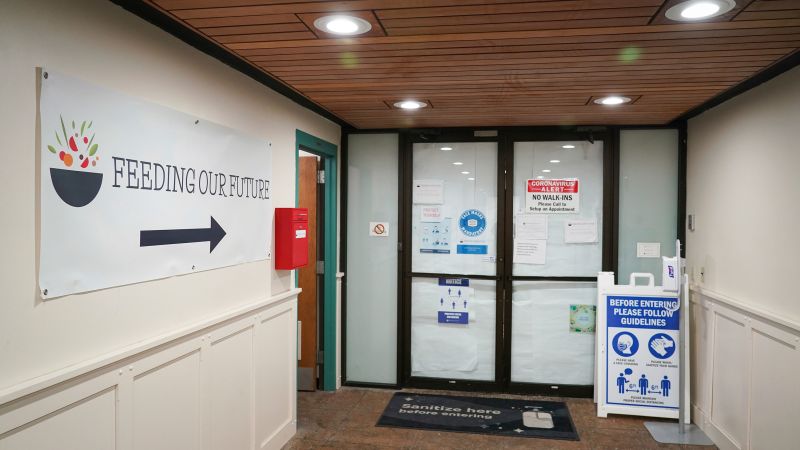
Eidleh is among dozens of individuals charged in 2022 for their involvement in a purportedly massive fraud operation. Prosecutors allege that the scheme exploited a federal initiative designed to provide meals to children during the pandemic, siphoning millions from the program. According to the indictment, Eidleh worked as an employee of Feeding Our Future, an organization that claimed to distribute meals to thousands of children in need. However, the legal documents suggest that only a fraction of the allocated funds actually reached the intended beneficiaries, while the remainder was funneled through shell companies and used for personal expenditures.
Federal Meal Program Under Attack
The federal child nutrition program, which Eidleh allegedly misused, was established to ensure food security for vulnerable populations during the pandemic. Prosecutors argue that the organization manipulated its structure to create an illusion of legitimacy, using fake websites and fabricated reports to inflate the number of meals served. These deceptive tactics, combined with the establishment of shell companies, allowed the group to siphon resources for luxury items such as high-end vehicles, real estate, and travel. Eidleh is specifically accused of designing these fraudulent fronts, ensuring the scheme remained hidden for years.
Charges and Allegations
The indictment against Eidleh includes 31 counts, covering a range of criminal offenses. These charges include conspiracy to commit wire fraud, wire fraud itself, conspiracy to defraud federal programs through bribery, and money laundering. Each count underscores the complexity of the scheme, which involved not only financial deception but also the manipulation of government contracts. The legal filings describe how Eidleh’s actions contributed to a systematic diversion of funds, leaving critical resources unavailable for children who relied on the program.
As part of the broader investigation, prosecutors detailed how the organization’s operations were structured to maximize financial gain while minimizing oversight. Eidleh allegedly played a central role in orchestrating this web of deceit, leveraging his position to control the flow of funds and obscure the organization’s true activities. The scheme, which spanned multiple years, targeted the federal program’s infrastructure, exploiting weaknesses in its monitoring systems to perpetuate the fraud.
Justice Pursued Across Borders
Assistant Attorney General Colin M. McDonald of the Department of Justice’s National Fraud Enforcement Division emphasized Eidleh’s significance in the case. “He not only stole taxpayer dollars, but he also deprived vulnerable children of the essential resources they needed to thrive,” McDonald stated in a press release. The arrest in Somalia highlights the international reach of the U.S. legal system, as Eidleh reportedly fled the country to avoid prosecution. This move, McDonald argued, was a “futile attempt to evade justice,” underscoring the gravity of the allegations.
“Eidleh’s actions exemplify the lengths to which individuals will go to exploit public funds. His arrest in Somalia is a testament to the Department of Justice’s commitment to holding perpetrators accountable, no matter where they seek refuge.”
The case has also drawn attention to the broader implications for federal oversight. With over $250 million at stake, the fraud scheme represents one of the most significant financial violations in Minnesota’s history. Prosecutors stress that the investigation revealed a pattern of behavior, with Eidleh’s alleged involvement signaling a coordinated effort to undermine the program’s objectives. The legal proceedings now face the challenge of establishing the full scope of the deception, as Eidleh’s cooperation or testimony could be pivotal in uncovering further details.
Trump’s Immigration Crackdown Linked to Fraud Case
President Donald Trump previously highlighted the fraud case as part of his rationale for implementing a sweeping immigration policy in Minnesota. The scheme, which siphoned millions from a public program, was used to justify stricter measures against individuals suspected of exploiting the system. While the connection between the fraud and Trump’s immigration actions remains a subject of debate, the case has reinforced the argument that financial misconduct can have far-reaching political consequences. The arrest of Eidleh in Somalia has reignited discussions about the effectiveness of such policies in addressing systemic fraud.
As the legal process unfolds, the focus will shift to determining the exact amount of funds diverted and identifying additional beneficiaries of the scheme. Eidleh’s detention in Somalia signals a turning point in the case, with the potential to bring more individuals to justice. The Department of Justice continues to investigate the network of shell companies and accomplices, aiming to dismantle the fraud operation entirely. This case serves as a reminder of the importance of transparency in federal programs and the need for robust enforcement to protect public resources.
Implications for Child Nutrition Programs
The fraud scheme has raised concerns about the integrity of child nutrition programs, which are critical for supporting families in need. With Eidleh’s alleged misuse of the system, the program’s ability to deliver meals to thousands of children has been compromised. The legal proceedings will also examine how the organization’s actions affected the daily lives of those dependent on the program, particularly during the pandemic when access to food was a pressing issue. The indictment’s 31 counts reflect the multifaceted nature of the crime, from financial manipulation to corruption of public trust.
Authorities are now working to ensure that the full extent of the fraud is exposed, with the hope of recovering lost funds and restoring faith in the program. Eidleh’s arrest in Somalia marks the culmination of a long investigation, but the case also highlights the challenges of tracking down individuals who exploit legal loopholes to avoid accountability. As the trial progresses, the focus will remain on the victims of the scheme and the broader impact of such misconduct on public welfare initiatives.